

Verification is a check of a player's documents that the organizer performs by hand. Not a phone confirmation and not an automatic procedure. The main thing to remember: verification is tied to the organizer, not to the tournament — check a player once and they count as verified across all your tournaments with open registration.
What verification is
The player sends photos — a passport or another document, plus a profile photo. You look at them and decide: approve or decline. That's all.
It matters where it is important that the person on the pitch is exactly the one who was entered: youth tournaments with age limits, trials, competitions with prize money.
The status is seen by the organizer — as a small icon in the player list, and only when the check is switched on. There is no «Verified» label on a player's card. Don't count on participants seeing each other's status.
The «Only verified players» switch
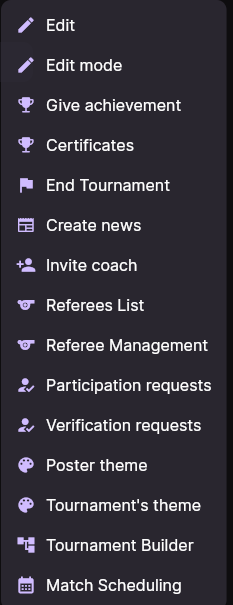
Turn it on in the tournament settings: tournament card → ⋮ menu → Edit → the Only verified players can participate in the tournament switch.

What it actually does:
- Registration by link requires documents. An invited person cannot finish registering until they attach photos — the app says so outright («Add photos of documents»), and the confirmation button turns into Send documents for verification.
- A coach cannot enter an unverified player. Only verified players are offered in the squad picker; if unverified ones already made it into the application, the coach sees a warning suggesting they be removed.
- In individual tournaments unverified players do not reach the main participant list or the draw — they go into a separate list.
The check works at the entrance — during registration and when the application is built. But the app will not stop you from putting an unverified player into the line-up for a specific match. If that matters to you, watch the line-ups separately and don't treat the switch as complete protection.
Two kinds of request: verification and participation
The tournament's ⋮ menu has two similar-looking items, and they get confused constantly. The difference is fundamental.
| Verification request | Participation request | |
|---|---|---|
| About | Who this person is — documents and identity | I want to play in this tournament |
| Tied to | You as the organizer | One specific tournament |
| What approval gives | The player counts as verified across all your tournaments with open registration | The player is admitted to this tournament — and their verification is counted at the same time |
| When the menu item appears | In individual tournaments and anywhere the check is switched on | Only in individual tournaments (trials) |
The practical takeaway: if you run several tournaments in a row, check players once through Verification requests — you won't have to do it again.
If you decline a verification, the player loses their place in your other tournaments where registration is still open. Declining «just in case» is not a local action.
Registering by link
An invite link is created from the tournament or team card, is valid for 7 days and comes in two kinds — for a player and for a coach. It can be bound to an already-created player, in which case whoever registers is attached to exactly that player.
What the invited person fills in: surname and first name, email, password, country and phone, then a six-digit code from the email and the consents.
When a phone number is required
By default the phone is required — without it the register button stays disabled. You can drop that requirement with the Phone number is not mandatory when registering players switch in the tournament settings.
If the tournament belongs to a main event, the app looks at the main event's setting, not this one's. Change it at the main-event level — otherwise editing the child changes nothing. More about main events in «Creating a tournament and getting teams in».
How to approve
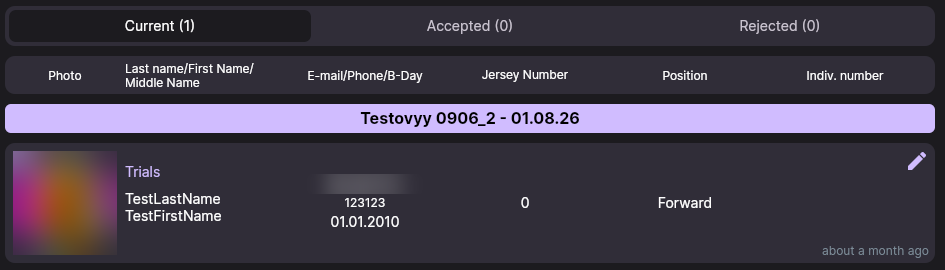
Open the tournament card → ⋮ menu → Verification requests. The list is split into Current, Accepted and Rejected tabs.
Tap a row and you get what the player sent: the document photos, the profile photo and the current status of the request. At the bottom are two buttons — Approve and Decline.
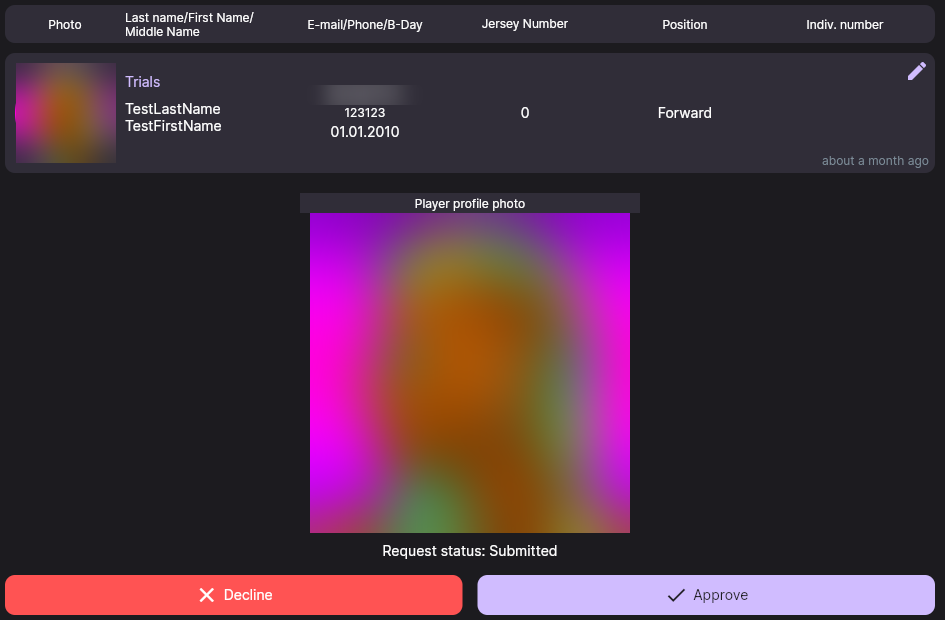
When declining, the app asks you to state a reason. It does not stay internal — the player sees it along with the message that the request was declined. Write it so the person understands what to re-shoot or correct.
If the player's card has mistakes in it, you can fix them right inside the request without declining it: the pencil icon opens a form with the surname, first name, date of birth, jersey number and position.
Troubleshooting
I can't see the «Participation requests» item
It only exists for individual tournaments — trials. In an ordinary team tournament players are entered by their coaches and the item is not needed.
A coach says they can't add a player to the application
Most likely the check is on and the player is not verified yet — they simply won't appear in the picker. Look at the Current tab in the verification requests.
A player can't finish registering by link
Two common cases: the document photos are not attached (with the check on), or the phone is empty while it is required. Another option — the link has expired: it lives for 7 days.
I verified a player and they still don't pass in another tournament
Verification applies to tournaments of the same organizer. If the second tournament is set up under a different organizer, the check has to be passed again.
Next steps
How to collect participants and send out invitations is covered in «Creating a tournament and getting teams in».
Still stuck? Write to support@nsgsoft.me and we will help you sort it out.