

Rating participants is available in matches of an individual tournament. A regular team match shows neither participant chips nor the rating mode — how the individual format works is covered in Individual tournament: one-on-one.
You define a list of criteria and a maximum score for each. That maximum acts as the weight: a criterion out of 20 counts four times as much as one out of 5. The participant's total is what they scored out of what was available, as a percentage.
Where it works
Rating is what trials and scouting run on: one shared set of criteria for the tournament and a comparable result per participant. Ratings are stored on the match — opening it, you see and edit one shared set of scores, not separate sheets from different observers.
Step 1. Criteria and maximum scores
The set of criteria belongs to the tournament. Open the tournament → the ⋮ menu → Edit and find the Player rating rules block: the criteria and their maximum scores are listed under the heading.

It does not merge anything in: it substitutes the organiser's set for the current one in the form. The replacement only takes effect once you save the tournament settings — if you hit it by accident, leave the settings without saving.
- Tap the pencil — Player rating rules opens.
- Give the rule a Name.
- Set the maximum score for each criterion in the field next to its name.
- Add Criteria pulls in another one from the organiser's list; the plus in the header creates a new criterion.
- Confirm with the tick in the header.
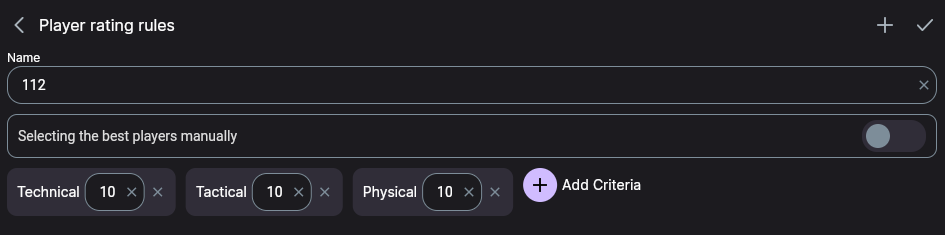
A criterion with a maximum of 0 cannot be rated, so a rule containing one will not save. If saving is refused, check that every row has a maximum.
The maximum score is the weight
The total is what was scored divided by what was available across the criteria you rated. So it matters not only how much you gave, but out of how much.
| Criterion | Maximum | Score |
|---|---|---|
| Technical | 10 | 10 |
| Tactical | 5 | 5 |
| Physical | 20 | 5 |
| Total | 35 | 20 → 57% |
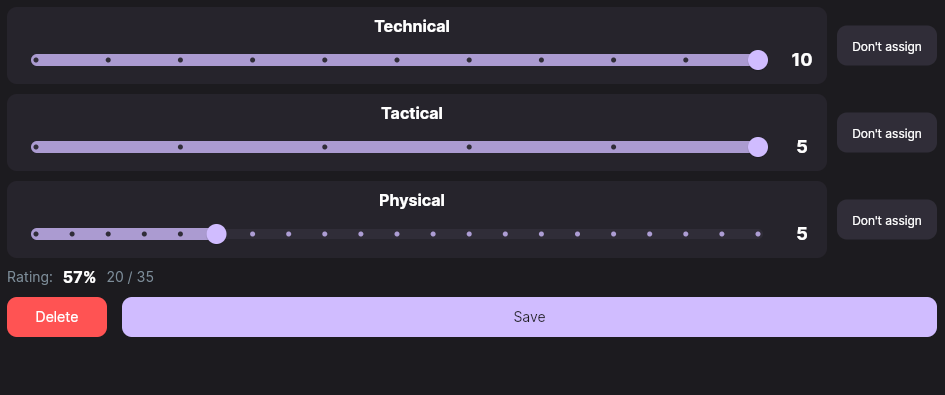
The participant is perfect on the two light criteria but poor on the heaviest one, and the total lands below halfway — because Physical outweighs the other two combined. Without weighting, all three scores would count equally and the picture would be the opposite.
The Don't assign button drops a criterion out of the maths entirely — out of both the scored and the available. That is not the same as giving a zero: a zero pulls the total down, a skip does not.
Step 2. Rate a participant
- Open a match of that tournament.
- The ⋮ menu → Edit mode.
- Participant chips appear. A red cross means not rated yet.
- Tap a participant — the criteria sliders unfold.

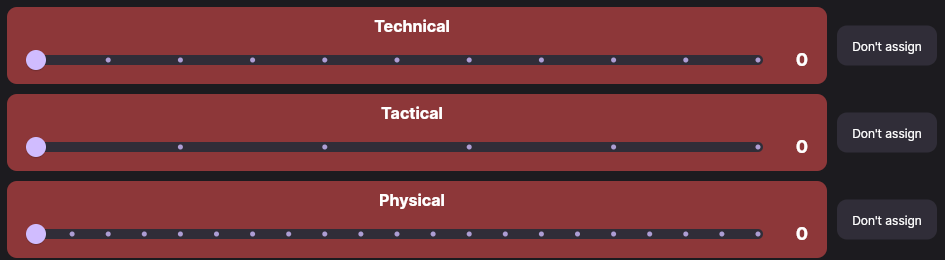
Every criterion has its own scale — as many steps as its maximum score.
As you set them, the running total appears below — the percentage and the raw points.
Save stays inactive while any criterion is still unrated: either give it a score or tap Don't assign.
What you see afterwards
Leave edit mode and the participant cards show the total along with the per-criterion breakdown and each scale.
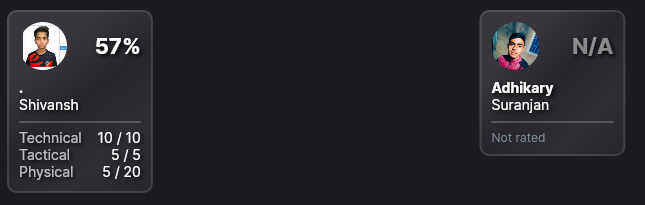
If every criterion is marked Don't assign, the rating still saves — but there is nothing to compute: the card keeps N/A and Not rated. That is a legitimate outcome — the observer chose not to rate that participant.
What to know in advance
- Rules come from the tournament. If the tournament has no set of its own, define one or substitute the organiser's with the circular arrow next to the pencil — and save the settings.
- Changed the maximums after rating? Totals recalculate with the new weights while the scores already given stay as they were — worth a second look.
- Ratings are entered in each match and totalled for the tournament. The individual tournament's Results tab ranks participants by their overall rating. The app adds all earned and all possible points across rated match criteria, then divides once; criteria marked Do not rate are excluded.
Troubleshooting
| Symptom | What to check |
|---|---|
| No participant chips in the match | Either the match is not from an individual tournament, or edit mode is off. |
| No sliders, the criteria list is empty | The tournament has no rating rule — see step 1. |
| Save is inactive | A criterion is still unrated: give it a score or tap Don't assign. |
| The rule will not save | The name is empty, or a criterion has a maximum of 0. |
| N/A instead of a percentage | Every criterion is marked “Don't assign” — there is nothing to compute. |
Next steps
Rating usually goes together with the one-on-one format — running it is covered in Individual tournament: one-on-one.
Still stuck? Write to support@nsgsoft.me — we will help.