

A penalty shootout is not a separate match or a separate mode — it is a continuation of the same match. Three things are needed: switch the shootout on in the rules, get the match to a level score in regulation, and press Start penalty shootout. The app then asks whether you want to enter the kicks one by one or just the final shootout score.
The usual situation: a semi-final ends level and one team has to go through. As long as the penalty shootout is not enabled in the tournament rules, the app knows nothing about it — there will be no button in the match, and the score stays a draw.
Step 1. Enable the shootout in the rules
- Open the tournament → the ⋮ menu in the header → Edit. The Tournament Settings page opens.
- Scroll down to the Standard match rules block and open the Match regulations card — the pencil on the right.
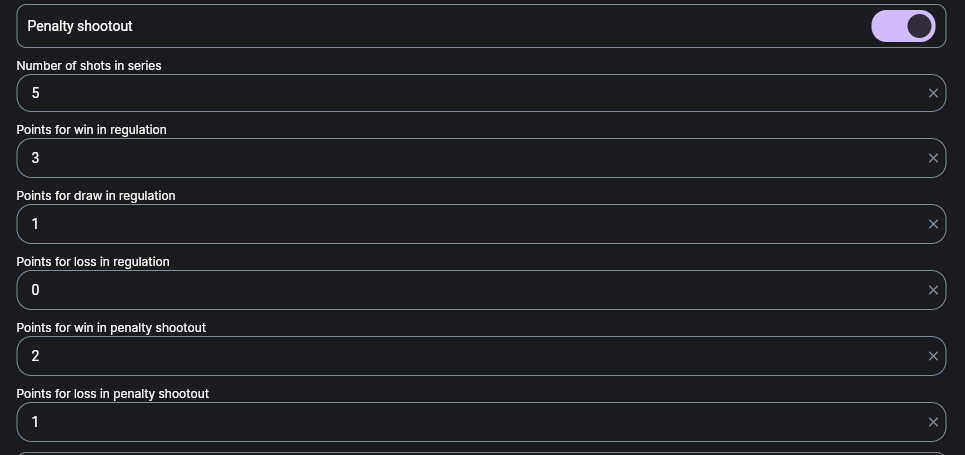
- On the screen that opens, turn on Penalty shootout.
- A Number of shots in series field appears below — how many kicks the main series has before sudden death. Usually 5, and 3 in youth formats.
- Save the settings.

Rules are set on the tournament, on the stage and on the individual match. A match takes the nearest one that is defined, and the match card says which: From tournament settings, From tournament stage settings or From match settings.
If your playoff stage has its own rules, the shootout has to be enabled on that stage: a tick in the tournament settings will not reach such a match.
Step 2. Points for the shootout
As soon as the shootout is enabled, two more fields appear in the same rules block next to the usual points:
| Field | Typical value |
|---|---|
| Points for win in regulation | 3 |
| Points for draw in regulation | 1 |
| Points for loss in regulation | 0 |
| Points for win in penalty shootout | 2 |
| Points for loss in penalty shootout | 1 |
These two fields only matter for groups and round-robin stages, where points decide the table. In a pure knockout you can leave them alone: there, winning is all that counts.
If the shootout points are not set, or match the regulation points, the table still treats the match as a draw: both teams get the draw points, and the separate shootout columns are not shown. The split only appears when the shootout points are set and differ from regulation.
Step 3. The shootout in the match
The Start penalty shootout button appears on its own once regulation — and extra time, if the rules define any — has ended level.
When you press it, the app asks Score only? and offers two paths:
| Button | What happens |
|---|---|
| Score only | A Penalty match score window opens: type the two numbers and save. No individual kicks are recorded. |
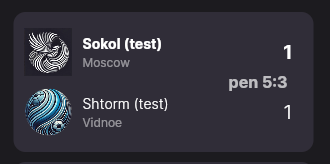
| Online | The match moves to the Penalty status and a row of circles appears — one per kick. Scored is green, missed is red. Every kick is recorded as a match event. |
Go with the online path when the match is being run event by event anyway: the protocol then keeps who took each kick and who scored. If you are simply recording the result of a match that has already been played, Score only is faster.
If you change the match management mode after entering the shootout, the app warns you: All penalties entered in another mode will be deleted! Do you want to continue? — and that is exactly what happens. Decide before the shootout, not after.
There is a known bug in the manual score entry: the dialog sometimes does not close after Save, and pressing it again adds the score on top of itself — 1:2 becomes 2:4. If the dialog stays open, close it and check the score on the match card instead of pressing again. We are fixing this.
The shootout score is also visible in the match settings — the Penalty match score home team and Penalty match score away team fields. But if the kicks were entered online, those fields are locked with the hint Penalties were entered online — edit them on the match screen: otherwise the score would drift away from the events.
How the shootout shows up in the standings
When shootout points are set separately, two extra columns appear in the standings — Wp and Lp, wins and losses in shootouts.
The important part: this is a breakdown, not an addition. The column hint says it outright — «Wins in a penalty shoot-out (included in total wins)». A team with 4 wins, 2 of them on penalties, shows 4 in the W column and 2 in Wp.
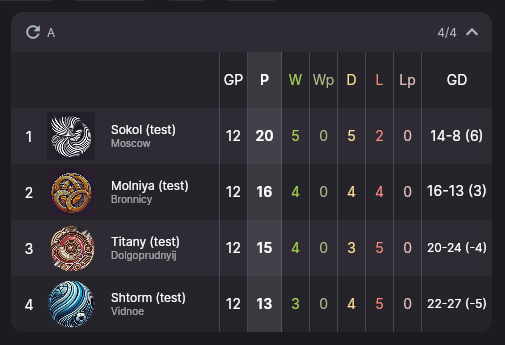
Organizers write in regularly: «the table says 4 wins and 10 points, but the results only show 2 clean wins — the standings are broken». They are not. Two regulation wins at 3 points plus two shootout wins at 2 points give exactly 4 wins and 10 points.
In the cross-table a match decided by a shootout carries a muted «w» or «l» mark. It only appears where regulation ended level and the series actually produced a winner — ordinary wins and draws carry no extra mark.
What to know in advance
- The shootout is enabled in the rules, not in the match. Inside a match you can only choose how to enter it.
- The main score stays level. A shootout does not turn 1:1 into 2:1 — it is stored as a separate score and decides the winner.
- A 0:0 shootout score means «no winner». Check it before finishing the match, or nobody advances in the bracket.
- No button on an uneven score. The shootout is only offered when regulation ended level.
- A shootout cannot be started twice. Once it has been played, the button is replaced by finishing the match — that is deliberate.
Troubleshooting
There is no «Start penalty shootout» button
Three reasons, by frequency: the shootout is off in the rules this match actually uses; the regulation score is not level; the shootout has already been played. Check the line on the match card that says where the rules come from — the tick may have gone onto the wrong level.
The shootout score fields are greyed out
That means the kicks were entered online. Edit them on the match screen, where the kick circles are.
The Wp and Lp columns did not appear
They only show when the shootout points are set and differ from the regulation points. With 3/1/0 and empty shootout fields there will be no columns.
The shootout score doubled
That is the double-Save bug. Open the match settings and fix the shootout score by hand.
Next steps
How match results add up into the table, and in which order the criteria apply when teams are level on points, is covered in «How the standings are calculated». For match management modes and entering results, see «Running a match».
Still stuck? Write to support@nsgsoft.me and we will help you sort it out.